
Run Agents
Start Claude Code, Codex, OpenCode, OpenClaw, or any other agent so its model traffic is signed and audited by the Agent Gateway.
Once Viper is installed and your agent is registered, you run the agent through Viper instead of on its own. The agent works as usual. Its model requests go through the gateway, where the Guardian Platform verifies them, applies your policies, and records them.
Before you start, finish Install Viper and Register Agents for the app you plan to run.
Wrapper mode and sidecar mode
- Wrapper mode. Viper launches the agent for you (
viper claude,viper codex, and so on). It starts a local proxy, points the agent at it, and shuts down when the agent exits. Use this on your own machine. - Sidecar mode. You run
viper proxy, which prints a local proxy URL, and you start the agent yourself with its base URL set to that address. Use this for servers, containers, Kubernetes, and any agent that is not a CLI you launch, and in OpenShell sandboxes, where wrapper commands refuse to run.
In both modes the agent keeps using its own provider credentials (your Anthropic or OpenAI key, or your subscription sign-in). The gateway does not hold or add provider keys; your credentials pass through to the provider unchanged.
In the sidecar examples below, replace https://gateway.example.com with your gateway address. --port fixes the local port; without it, Viper picks a free port and prints the URL. The gateway forwards the request path to the provider unchanged, so the base URL plus the path the agent’s SDK appends must form the provider’s real path. OpenAI SDK clients append /chat/completions and need /v1 on the base URL; Anthropic SDK clients add /v1 themselves and take the proxy address as is.
viper proxy prints its local address and nothing else, so a script can capture it:
$ viper proxy --app claude --port 8080 --gateway-endpoint https://gateway.example.com/v1/anthropic_api
http://localhost:8080
To watch requests pass through, add --stdout-traffic summary. Viper prints a line for each request and its response. Claude Code streams its responses, so each response line reads sse, with the request body size in bytes and the time until the stream started:
[viper proxy] -> POST /v1/messages
[viper proxy] <- POST /v1/messages 200 sse (1234 bytes in) 812ms
A response that does not stream shows both body sizes instead, such as 200 (1234 in, 5678 out) 812ms.
Claude Code
viper claude                     # your usual session, through the gateway
viper claude --resume            # Claude Code arguments pass through unchanged
Sidecar mode:
viper proxy --app claude --port 8080 \
  --gateway-endpoint https://gateway.example.com/v1/anthropic_api
ANTHROPIC_BASE_URL=http://127.0.0.1:8080 claude
Codex
viper codex
viper codex --model o3          # Codex arguments pass through; `--` is optional
Viper adds its own endpoint setting after your Codex options, ahead of any --, so that its override always wins; your arguments still reach Codex. If Codex has an OpenAI API key (from OPENAI_API_KEY or its saved sign-in), Viper routes to the OpenAI API. Otherwise it routes to the ChatGPT backend that a ChatGPT sign-in uses.
Use a ChatGPT sign-in with Codex for now. With an API key, Codex sends its requests without /v1, so the OpenAI API answers 404.
Sidecar mode (ChatGPT sign-in):
viper proxy --app codex --port 8080 \
  --gateway-endpoint https://gateway.example.com/v1/chatgpt_backend/codex
codex -c 'openai_base_url="http://127.0.0.1:8080"'
OpenCode
Run viper opencode, or in sidecar mode:
viper proxy --app opencode --port 8080 \
  --gateway-endpoint https://gateway.example.com/v1/chatgpt_backend
OPENAI_BASE_URL=http://127.0.0.1:8080 opencode
OpenClaw
Run viper openclaw. OpenClaw can talk to four provider families at once, so the wrapper starts one proxy per family. In sidecar mode you must run all four yourself. Any family you leave out goes straight to the vendor, and nothing warns you:
viper proxy --app openclaw --port 8080 --gateway-endpoint https://gateway.example.com/v1/anthropic_api &
viper proxy --app openclaw --port 8081 --gateway-endpoint https://gateway.example.com/v1/openai_api &
viper proxy --app openclaw --port 8082 --gateway-endpoint https://gateway.example.com/v1/chatgpt_backend &
viper proxy --app openclaw --port 8083 --gateway-endpoint https://gateway.example.com/v1/chatgpt_backend/codex &

ANTHROPIC_BASE_URL=http://127.0.0.1:8080 \
OPENAI_BASE_URL=http://127.0.0.1:8081 \
CHATGPT_BACKEND_BASE_URL=http://127.0.0.1:8082 \
OPENAI_CODEX_BASE_URL=http://127.0.0.1:8083 \
  openclaw
Any other agent
For an agent Viper does not wrap, run a proxy with --app proxy and point the agent’s model client at it. No SDK is needed beyond the base URL.
viper proxy --app proxy --port 8080 \
  --gateway-endpoint https://gateway.example.com/v1/openai_api &
python agent.pymodel = ChatOpenAI(
model="gpt-4o",
base_url="http://127.0.0.1:8080/v1", # the Viper proxy; OpenAI clients need /v1
api_key=os.environ["OPENAI_API_KEY"], # your own key; it passes through the gateway
)For an Anthropic client, use /v1/anthropic_api as the gateway endpoint and give the client the proxy address with no /v1; the Anthropic SDK adds it.
Requests sent this way are signed as the proxy itself. To have the Guardian Platform tell your agents apart, run each as a named agent with its own key, as the LangGraph and Deep Agents quickstarts do. The Guardian Agent SDK does that for any Python agent, and its Proxy API reference describes it for agents in other languages.
Which providers each agent routes
| Agent | Provider families routed through the gateway |
|---|---|
| Claude Code | Anthropic |
| Codex | OpenAI API or ChatGPT backend, depending on how Codex signs in |
| OpenCode | OpenAI only |
| OpenClaw | Anthropic, OpenAI API, ChatGPT backend, and ChatGPT Codex backend |
| Any other agent | Whichever endpoint you give viper proxy |
When Viper refuses to start OpenCode or OpenClaw
A session that looks governed while some of its traffic goes directly to a vendor is worse than no session. So before launching OpenCode or OpenClaw, Viper reads the agent’s configuration and refuses to start if it would route around the gateway:
| Refused configuration | OpenCode | OpenClaw |
|---|---|---|
A provider family Viper does not route (for example a non-OpenAI provider in OpenCode, or ollama in OpenClaw) | Yes | Yes |
| A routed provider with its own pinned base URL | Yes | Yes |
A --model on the command line that selects an unrouted family | Yes | Yes |
| A configuration file that cannot be parsed | Yes | Yes |
The error lists each offending entry. Remove or disable those entries (OpenClaw ignores providers set to "enabled": false), or run the agent without Viper and accept that its traffic is neither signed nor audited. viper proxy runs the same configuration-file checks when you start it with --app opencode or --app openclaw; the one check it cannot do is the command-line --model one, because it does not see the launch.
Capture the agent’s other traffic
Wrapper commands accept --egress-capture, which also routes the agent’s non-model HTTP and HTTPS traffic (package downloads, web fetches, git, and so on) through the gateway. To read HTTPS, Viper decrypts it locally with its own root certificate, and it tells Node, Python, curl, and git to trust that certificate for the session.
viper claude --egress-captureOn macOS, some tools (notably Go programs such as gh) check only the system keychain and fail with x509: certificate is not trusted. Run viper ca trust once to add Viper’s root to your login keychain for SSL only. viper ca trust --check reports the status, and viper ca untrust removes it.
Check that it worked
viper doctorpasses, with a line for the app readingdid:key:… is registered, and the gateway accepts its signature. (viper did listlists the keys on this machine but does not show whether they are registered.)- Each session writes its own log file in
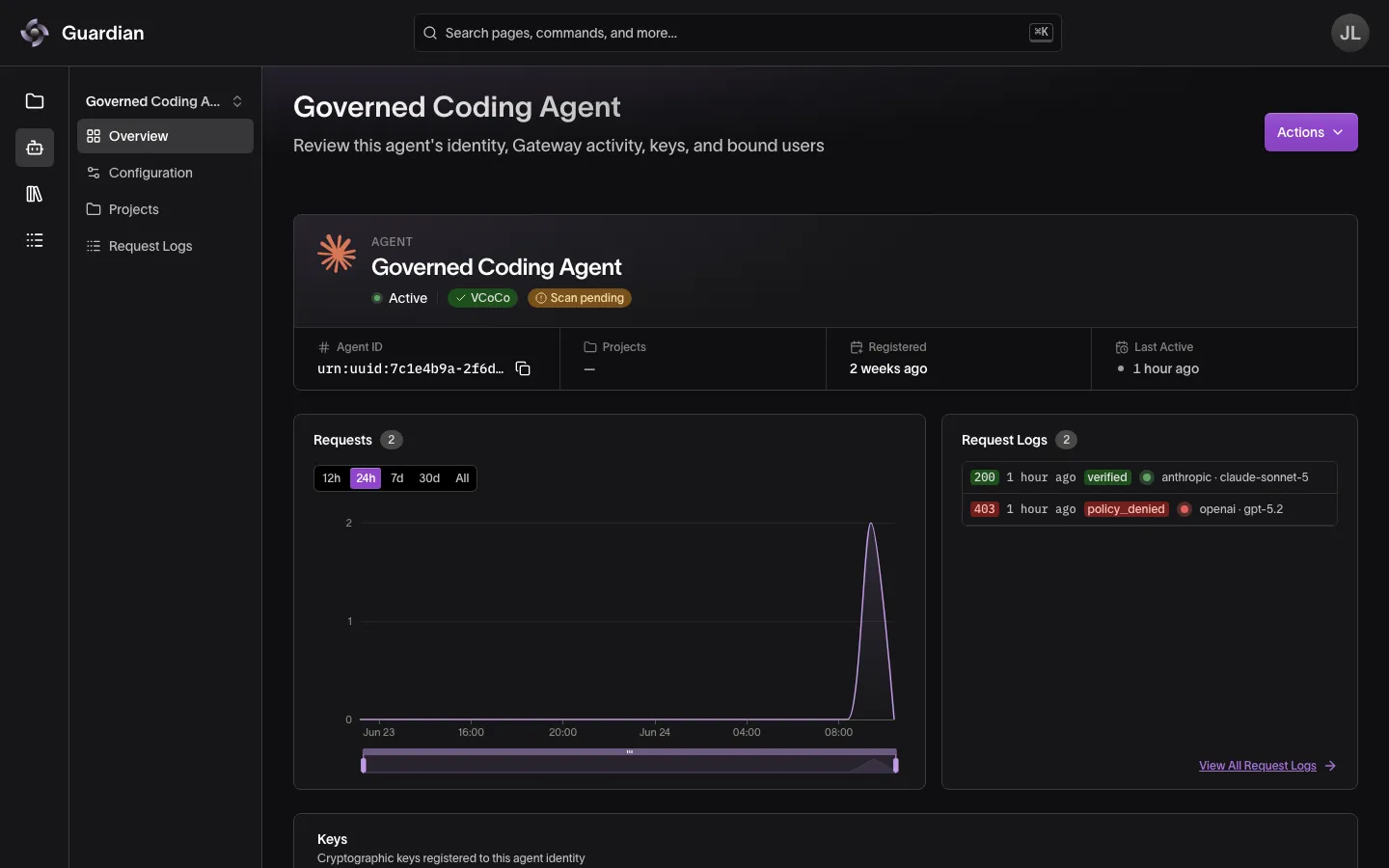
~/.config/viper/logs/, namedviper-<date>-<time>-<pid>.log. In wrapper mode, the newest file has anLLM proxy servers startedline listing one local proxy per provider family. - In the Agent Catalog, the agent’s Requests / 12h and Last Active update, and its requests appear in the audit trail.
- If Viper cannot sign a request, the agent gets a
502error and the request is not sent. Unsigned traffic never falls back to the provider. - Every error Viper makes itself carries an
X-Viper-Error: 1header, which it never passes on from the gateway or the provider, so a client can tell them apart. For a request that names an agent, the error has the agent API’s shape,{"error": {"code", "message", "hint"}}.
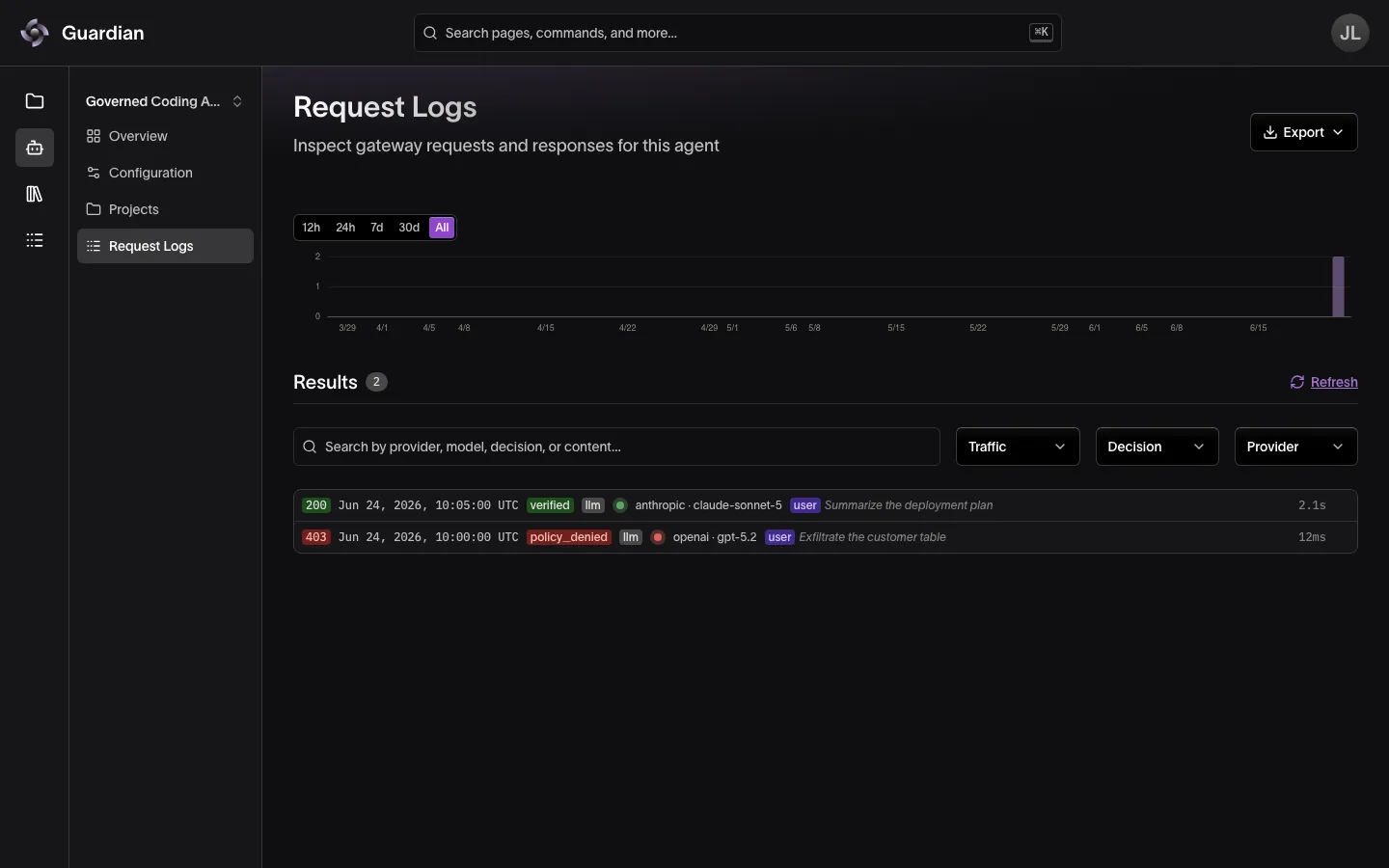
Open View All Request Logs to see each request with its status and decision:
Troubleshooting
Start with viper doctor. It checks the config, that the gateway answers, that each agent and app key is registered and accepted, and the local CA, and prints a fix for each problem. It changes no configuration, keys or credentials, and exits nonzero if a check fails, so it can gate a script. A check it cannot make, such as a YubiKey key with no PIN to hand, is skipped and does not fail the run. What doctor reports explains each result.
| Symptom | What to do |
|---|---|
no DID configured for <agent> | Create and assign a key: viper did add --assign <app>. |
<agent> executable not found in PATH | Install the agent CLI, or add its directory to PATH. |
openclaw executable not found | Set OPENCLAW_BIN to the OpenClaw binary, or install OpenClaw on PATH. |
configuration cannot be fully mediated by viper | Remove the providers or base URLs named in the error (see the refusal table above). |
cannot be fully mediated by viper inside an OpenShell sandbox | Wrapper commands refuse to run in an OpenShell sandbox, because the agent would share Viper’s network access. Run the agent beside viper proxy; see the OpenShell quickstart. |
no llm_gateway_api_url configured | Set llm_gateway_api_url in Viper’s configuration file, or set VIPER_GATEWAY_URL. See Viper Configuration. |
llm_gateway_api_url path must be `/v1` or empty | The address in config.toml has an extra path, usually /v1/v1 from entering a gateway URL ending in /v1 at the first-run prompt. Set llm_gateway_api_url to the gateway’s origin followed by /v1, such as https://gateway.example.com/v1. |
could not reach the gateway at <url> (502) | The gateway is down or unreachable from this machine, or llm_gateway_api_url names the wrong address. Nothing was sent. If the error says the TLS certificate was not accepted, check the address matches the certificate’s host and that this machine trusts the authority that issued it. If it says the TLS connection failed, check the address uses https only if the gateway does. |
Upstream request failed: could not reach the gateway endpoint <url> (502, or upstream_unreachable) | The request was signed, but the proxy’s gateway endpoint did not answer. Check the gateway is up, and that viper proxy --gateway-endpoint names it. Wrapper commands and relay mode use llm_gateway_api_url instead. Viper marks it x-should-retry: true, so OpenAI’s and Anthropic’s clients retry it on their own. |
upstream_response_lost (502, or 500) | The request reached the proxy’s gateway endpoint, but no complete answer came back: the connection dropped, timed out or the answer could not be passed on. The model may have run, so check before sending the request again; Viper’s SDK doesn’t retry it. Viper marks it x-should-retry: false, so OpenAI’s and Anthropic’s clients don’t retry it on their own. |
request_unreadable (400, or 413) | The proxy could not take in the request’s body: it broke off on the way in, so send it again, or it was over relay mode’s 32 MiB limit, so send less. Viper marks it x-should-retry: false, so OpenAI’s and Anthropic’s clients don’t resend it themselves: resend it from your code. |
Gateway rejected traffic: signing key is not registered (502) | The Guardian Platform does not know the key. Register it: viper agent register <name> for a named agent, viper did register --app <app> otherwise. Nothing was sent. |
Gateway rejected traffic: Agent access has been revoked (502) | An Organization Owner can restore the agent from its detail page in Guardian. Nothing was sent. |
Failed to collect identity attestation data (500, or signing_failed) | The key is on a YubiKey that could not be read. Check it is plugged in and, on Linux, that the smart card service (pcscd) is running. Nothing was sent. |
Any other 502 or signing_failed | Viper could not sign the request, so it did not send it. The session log says why, and the response’s hint says what to do when there is one. Unsigned traffic never falls back to the provider. |
agent_not_enrolled (409) | The agent the request names has no key on this machine. Run viper agent add <name>, register it, and restart the proxy. |
gateway endpoint ... is not an http(s) URL | Pass viper proxy --gateway-endpoint the full URL of the gateway’s provider API, for example https://gateway.example.com/v1/openai_api. |
unsupported_endpoint (404) | The request reached a gateway route that does not exist. Check the proxy’s --gateway-endpoint matches the provider the agent calls, for example /v1/openai_api for an OpenAI client. |
sig_missing_headers (401) from the gateway | The request bypassed Viper and went straight to the gateway unsigned, which the gateway refuses. Point the agent’s base URL at the Viper proxy. |
x509: certificate is not trusted with --egress-capture on macOS | Run viper ca trust. |
Related
- Register Agents — enroll the key before you run the agent
- Agent Coverage — what each way of running an agent records and what it misses
- LangGraph Quickstart — run an application as a named agent with its own key
- Deep Agents Quickstart — run an agent with sub-agents as a named agent
- OpenShell Quickstart — run an agent in a sandbox where Viper is its only way out
- Audit Trail — confirm the agent’s requests were recorded