
Activity Logs
Search, filter, and export the record of who did what in your organization, from member and role changes to policies, declarations, and credentials.
About Activity Logs
Activity Logs record user actions performed within Guardian, providing a detailed audit trail for reviewers and administrators.
They are available to users with permission to View Project Data in an organization or any of their projects. Organization Owners see every log in the organization; other users see logs from the projects they belong to.
Key concepts and actions associated with Activity Logs include:
Understanding Activity Logs
Each entry records who did what, when, and in which project. The sections below list what an entry contains, the actions captured, and how long entries are kept.
Log Entries
Each log entry contains:
- The date and time the action was taken
- The user who performed the action, taken from their authenticated session rather than from the request, so an entry cannot be attributed to someone else
- The action itself, and the kind of resource it acted on
- The project in which the action occurred, or Organization-level for an action outside any project
- The raw JSON log of the action
Select an entry to open its detail panel, which shows the log UUID, the user and their email, the action, resource, scope, and time, and the Raw log. Use the previous and next controls to step through entries.
Actions Captured
Activity Logs record all actions considered critical to an organization’s operations, including:
User & Access Management
- Adding, importing, and removing organization members, and managing their roles
- Adding and removing project members, and managing their roles
- Creating and revoking user API keys
- Issuing and revoking a credential
Project Lifecycle
- Creating, archiving, and reapplying a project
Policies
- Creating a policy
- Applying, archiving, or reapplying an applied policy within a project
- Creating declarations and reviews
Indicators
- Creating, applying, activating, and disabling an indicator
Gateway Agents
- Generating an agent registration token
- Associating a gateway agent with a project, and revoking that membership
- Revoking and restoring a gateway agent
- Downloading a gateway agent’s synced credential, and an exchange’s request or response body
Agent Certifications
- Issuing an agent certification, including when a retry issues it
- Attaching an agent certification to the gateway
- Revoking an agent certification
- Downloading an agent certification
Programs
- Creating a program and publishing a new version
- Assigning and removing program reviewers
Reports and Exports
- Exporting a PDF report for an applied policy
- Exporting a policy definition or a draft policy definition, and downloading the default policy template or a lineage manifest
- Exporting evaluation logs or an agent’s request logs, and exporting the activity logs themselves
- Downloading a policy credential
- Downloading a project membership credential
Retention & Access
Activity Logs are retained for the lifetime of the Guardian Platform deployment. Logs are not automatically wiped or purged, and persist as long as they remain stored in a database.
Accessing Activity Logs
There are multiple ways to access Activity Logs:
From the sidebar
After signing in to Guardian:
- Select the Activity Logs icon in the navigation sidebar to view logs across all projects
From a specific project
After signing in to Guardian:
- Select a project within Projects, then select Dashboard in the project sidebar
- On the Activity Logs card, select See All
- You will be navigated to Activity Logs with the project filter already applied, so only actions performed within that project are shown
From a member’s page
After signing in to Guardian:
- Select a member within Organization Members → Member Details
- Scroll to the Activity section → Select View All Activity
- You will be navigated to Activity Logs with the user filter already applied, so only actions performed by that member are shown
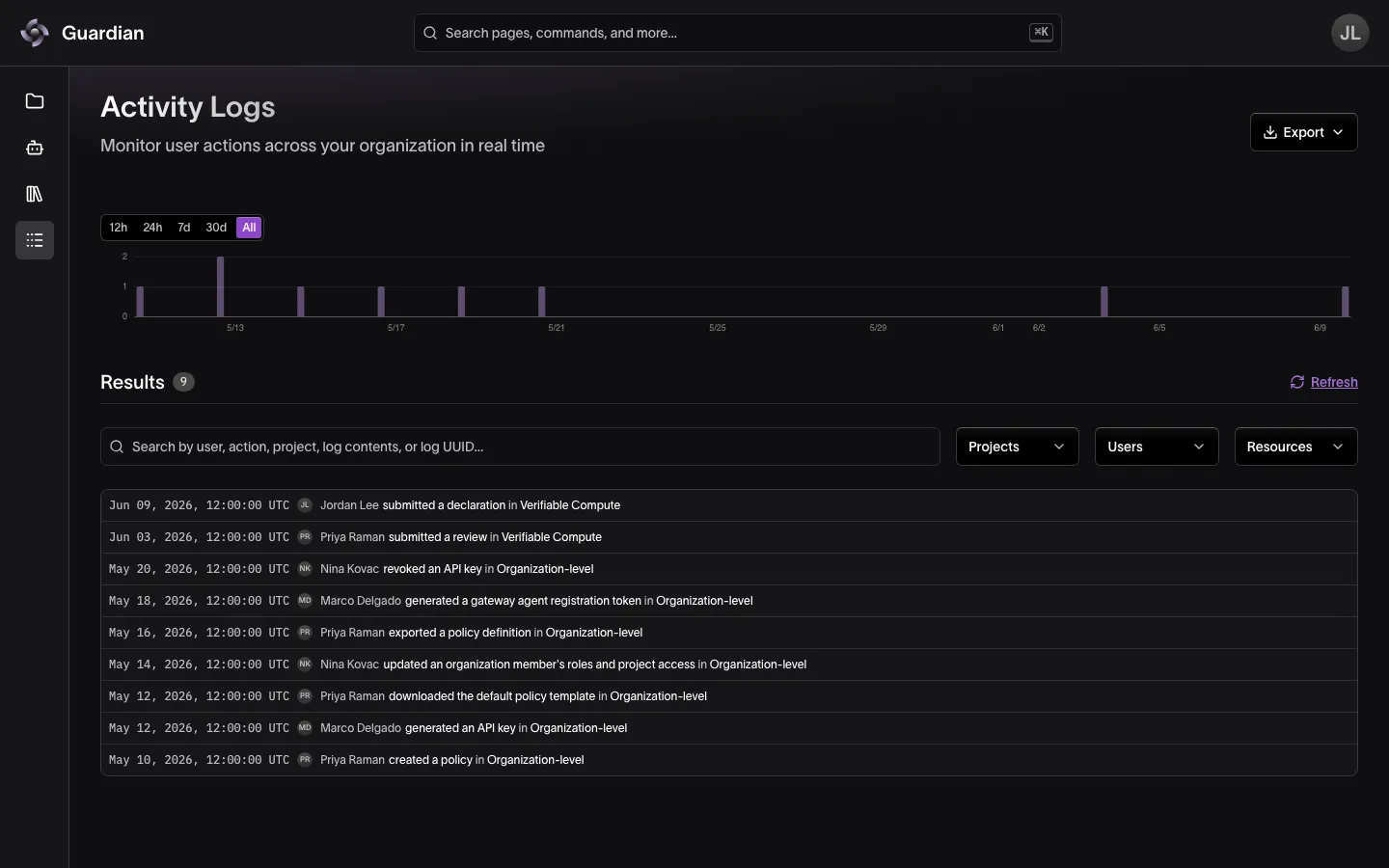
Searching and Filtering
Activity Logs can be searched by user, action, project, log content, or log UUID using the search bar, and filtered by:
- Time window — 12h, 24h, 7d, 30d, or All above the chart. Drag across the chart to narrow it to a range, and select Clear range to undo that.
- Projects, including Organization-level for actions outside any project
- Users
- Resources
Pin an entry to keep it in view while you investigate, and show pinned entries only when you need them. Select Refresh to load entries recorded since you opened the page.
Exporting Logs
From the Export menu, select Export as JSONL for programmatic review or Export as CSV for spreadsheet-based review. The export contains the entries that match your current search and filters, and is named logs-<organization>-<date>. The export itself is recorded as an entry.
Reading Logs from the API
To read logs from a script, call the Governance Service at your platform host followed by /governanceService. These calls need View Project Data, and accept your sign-in token or an API key with that scope. The example below reads the key from GUARDIAN_API_KEY.
| Request | What it returns |
|---|---|
GET /api/v1/projects/{projectId}/activity-logs | Every entry in the project. projectId is the project’s UUID. |
GET /api/v1/organizations/{orgId}/activity-logs | Every entry in the organization for Organization Owners; for anyone else, the entries from their projects |
GET /api/v1/organizations/{orgId}/members/{userId}/activity-logs | One member’s entries. Add since (RFC 3339) to return only entries from that time on. |
GET /api/v1/organizations/ lists organizations with their IDs. To read a project’s logs:
curl "https://guardian.example.com/governanceService/api/v1/projects/<project UUID>/activity-logs" \
  -H "Authorization: Bearer $GUARDIAN_API_KEY"
The response is a JSON array of every entry in the project:
[
  {
    "id": 9182,
    "uuid": "urn:uuid:…",
    "projectId": 15,
    "projectName": "Verifiable Compute",
    "userName": "Jordan Lee",
    "userEmail": "jordan.lee@example.com",
    "action": "submitted a declaration",
    "resource": "Declaration",
    "createdAt": "2026-10-15T14:02:11Z",
    "logs": { "declarationId": 412, "subject": "Quarterly access review completed" }
  }
]
Searching, filtering, and JSONL or CSV export happen in Guardian. The API filters only by time, with since on the member route.
Related
- Member Management — open a member’s activity from their page
- Roles and Permissions — the View Project Data permission that grants access
- Governance Service Authentication and RBAC — which log entries owners and project members can read
- Audit Trail — the gateway’s separate record of agent requests