
Roles and Permissions
Look up what each organization and project role can do, and who can assign them.
About roles and permissions
A role is the position a user is assigned within Guardian.
Permissions are actions a user is granted based on their role.
Key concepts and actions associated with roles and permissions include:
Understanding roles
There are seven project and compliance roles in Guardian, each designed to support specific functions within your compliance workflow, plus an organization-level Agent Operator role for agent enrollment.
| Role | Role Description | Typical Personas |
|---|---|---|
| Organization Owner | Has full administrative access to the organization, including members, policies, agents, and all projects | Chief Compliance Officer, VP of Engineering, Head of GRC |
| Agent Operator | Can register agents with the gateway and view organization data | Platform Engineer, DevOps Engineer, Fleet Operator |
| Project Owner | Has full access to the project, including settings, members, policies, and indicators | Engineering Manager, Product Manager, Compliance Manager |
| Implementation Owner | Can create declarations and submit controls for review | Senior Engineer, Tech Lead, Compliance Analyst |
| Implementation Contributor | Can create declarations, but cannot submit controls for review | Junior Engineer, Compliance Associate |
| Audit Owner | Can comment on reviews, determine compliance outcomes, and manage policy credentials | Head of Compliance, Chief Auditor, Internal Audit Director |
| Audit Contributor | Can comment on reviews, but cannot determine compliance outcomes | Junior Auditor, Internal Auditor, Compliance Reviewer |
| Project Viewer | Can view project data, but cannot make changes | Executive Stakeholder, External Auditor, Board Member |
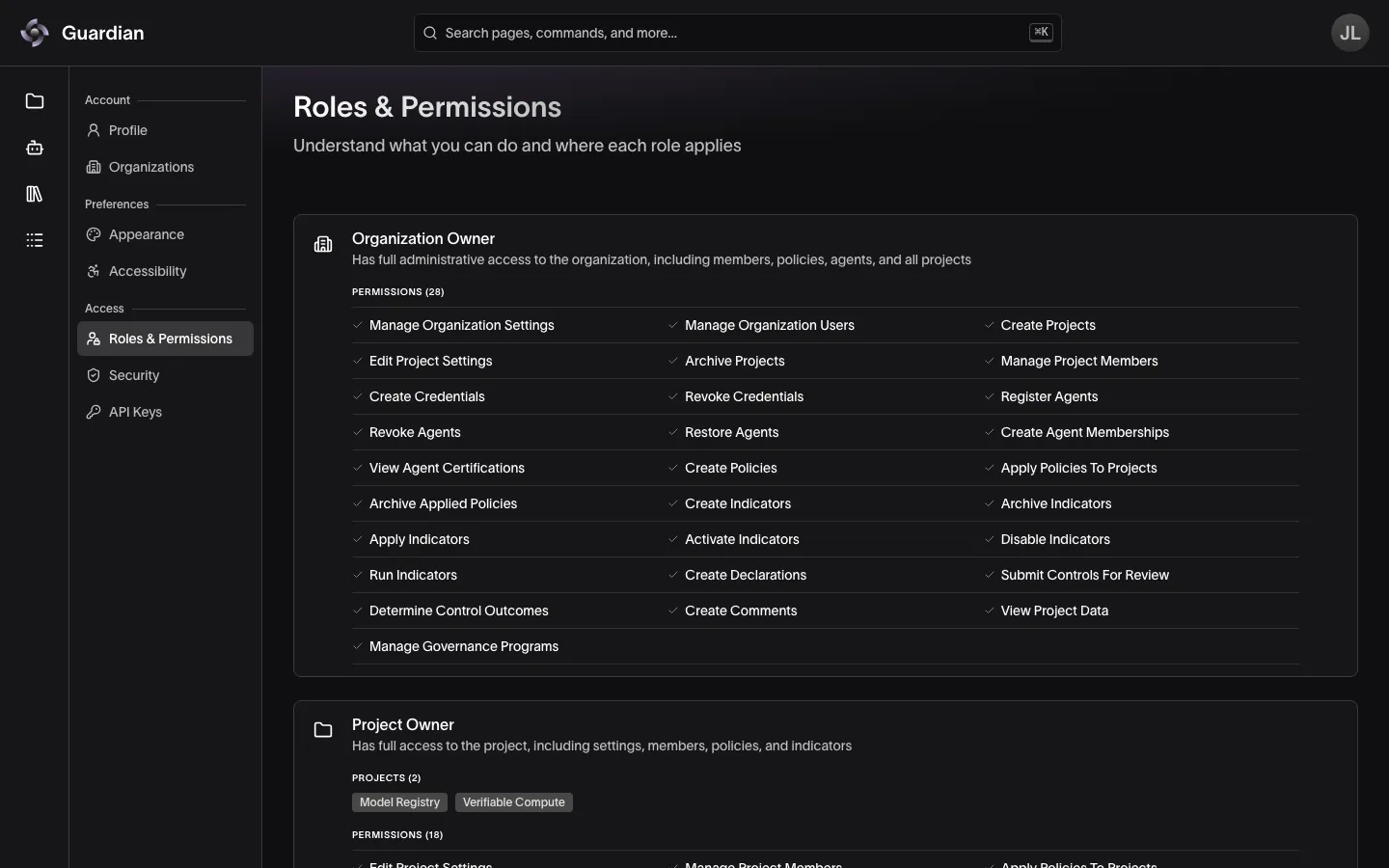
To see the roles you hold and what each one permits, open Settings → Roles & Permissions:
Understanding permissions
| Permissions | Permissions Definition |
|---|---|
| Manage Organization Settings | Manage organization-wide settings and preferences |
| Manage Organization Users | Add and remove users, and assign roles within the organization |
| Register Agents | Register gateway agents under your account |
| Create Agent Memberships | Associate a registered agent with a project |
| View Agent Certifications | Read certifications and credentials of agents you operate or view |
| Create Projects | Create projects within the organization |
| Edit Project Settings | Edit project settings and export PDF reports |
| Archive Projects | Archive projects within the organization |
| Manage Project Members | Add and remove project members, and assign roles within the project |
| Create Policies | Create or upload policies for the organization |
| Apply Policies to Projects | Apply a policy to a project |
| Archive Applied Policies | Archive policies applied to projects |
| Create Credentials | Issue credentials for an applied policy |
| Revoke Credentials | Revoke an issued credential for an applied policy |
| Create Indicators | Create an indicator for a project |
| Archive Indicators | Archive an indicator within a project |
| Apply Indicators | Apply an indicator to an applied policy’s control |
| Activate Indicators | Activate applied indicators so they log evaluations |
| Disable Indicators | Disable applied indicators so they do not log evaluations |
| Run Indicators | Run indicators to receive and log evaluations |
| Create Declarations | Submit a declaration to a control |
| Submit Controls for Review | Submit a control as ready for review |
| Determine Control Outcomes | Determine a control as Compliant, Non-compliant, or Not Applicable |
| Create Comments | Submit a comment to a control |
| View Project Data | View project data (read-only access) |
| Manage Governance Programs | Create programs, assign their reviewers, and retry or revoke agent certifications, but never retry one for an assessment you started |
| Submit Agent Assessments | Start, draft and submit assessments of the agents you can see, and read those agents for them; every member holds it |
| Review Agent Assessments | Review assessments of the programs you’re assigned to review, and retry or revoke the certifications your reviews issued; every member holds it |
Role and permissions matrix
Each role is composed of specific permissions as shown in the table below.
A check (✅) indicates the role has this permission, while an X (❌) indicates it does not.
| Permissions | Organization Owner | Project Owner | Implementation Owner | Implementation Contributor | Audit Owner | Audit Contributor | Project Viewer |
|---|---|---|---|---|---|---|---|
| Manage Organization Settings | ✅ | ❌ | ❌ | ❌ | ❌ | ❌ | ❌ |
| Manage Organization Users | ✅ | ❌ | ❌ | ❌ | ❌ | ❌ | ❌ |
| Register Agents | ✅ | ❌ | ❌ | ❌ | ❌ | ❌ | ❌ |
| Create Agent Memberships | ✅ | ✅ | ❌ | ❌ | ❌ | ❌ | ❌ |
| View Agent Certifications | ✅ | ❌ | ❌ | ❌ | ❌ | ❌ | ❌ |
| Create Projects | ✅ | ❌ | ❌ | ❌ | ❌ | ❌ | ❌ |
| Edit Project Settings | ✅ | ✅ | ❌ | ❌ | ❌ | ❌ | ❌ |
| Archive Projects | ✅ | ❌ | ❌ | ❌ | ❌ | ❌ | ❌ |
| Manage Project Members | ✅ | ✅ | ❌ | ❌ | ❌ | ❌ | ❌ |
| Create Policies | ✅ | ❌ | ❌ | ❌ | ❌ | ❌ | ❌ |
| Apply Policies to Projects | ✅ | ✅ | ❌ | ❌ | ❌ | ❌ | ❌ |
| Archive Applied Policies | ✅ | ✅ | ❌ | ❌ | ❌ | ❌ | ❌ |
| Create Credentials | ✅ | ✅ | ❌ | ❌ | ✅ | ❌ | ❌ |
| Revoke Credentials | ✅ | ✅ | ❌ | ❌ | ✅ | ❌ | ❌ |
| Create Indicators | ✅ | ✅ | ❌ | ❌ | ❌ | ❌ | ❌ |
| Archive Indicators | ✅ | ✅ | ❌ | ❌ | ❌ | ❌ | ❌ |
| Apply Indicators | ✅ | ✅ | ❌ | ❌ | ❌ | ❌ | ❌ |
| Activate Indicators | ✅ | ✅ | ❌ | ❌ | ❌ | ❌ | ❌ |
| Disable Indicators | ✅ | ✅ | ❌ | ❌ | ❌ | ❌ | ❌ |
| Run Indicators | ✅ | ✅ | ✅ | ✅ | ✅ | ✅ | ❌ |
| Create Declarations | ✅ | ✅ | ✅ | ✅ | ❌ | ❌ | ❌ |
| Submit Controls for Review | ✅ | ✅ | ✅ | ❌ | ❌ | ❌ | ❌ |
| Determine Control Outcomes | ✅ | ✅ | ❌ | ❌ | ✅ | ❌ | ❌ |
| Create Comments | ✅ | ✅ | ❌ | ❌ | ✅ | ✅ | ❌ |
| View Project Data | ✅ | ✅ | ✅ | ✅ | ✅ | ✅ | ✅ |
| Manage Governance Programs | ✅ | ❌ | ❌ | ❌ | ❌ | ❌ | ❌ |
Agent Operator is assigned on the organization rather than on a project, so it is not a column in the matrix above. It grants Register Agents, View Agent Certifications, and View Project Data, so an operator can enroll agents, read the certifications of the agents they are bound to, and use Guardian. It does not grant Create Agent Memberships — associating an agent with a project stays with the Project Owner or Organization Owner. Organization Owners already have Register Agents and View Agent Certifications.
Assign Agent Operator to people who should enroll agents without administering the organization. See Register Agents.
Agent revocation. Revoke Agents and Restore Agents also appear among the Organization Owner’s permissions in Settings, but are left out of the tables above because no other role holds them. They cannot be assigned to another role, scoped to a project, or exercised by an API key.
Agent certification. Every member of an organization holds Submit Agent Assessments and Review Agent Assessments, whatever their roles, so they can choose them as API key scopes. No role grants them, so they are left out of the matrix above and of the role cards in Settings. A member here is anyone with a role in the organization, Agent Operator or a project role included; they lose both with their last role there. Neither decides who works on an assessment: whoever started it drafts and submits it, and an Organization Owner assigns a program’s reviewers. A reviewer’s passing verdict issues the certification straight away only when they hold a role that can sign with the platform key: Audit Owner, Organization Owner, or Project Owner. See Governance Programs.
Managing user roles
Assigning the right roles ensures users have appropriate access to perform their compliance work while maintaining security and separation of duties.
Organization Owners can assign roles to all users across projects. Project Owners can only assign roles within projects they manage. For the steps, see Member Management.
When assigning roles, consider:
- Separation of duties: Implementation and audit roles are designed to maintain independence between those who implement controls and those who review them
- Junior team members: Contributor roles allow junior staff to participate without actioning definitive compliance outcomes
- Multiple roles: Users can be assigned multiple roles within a single project and/or across multiple projects
Related
- Member Management — assign and change roles for organization and project members
- RBAC and Membership — the same roles as Auth Service enforces them, with access troubleshooting
- Register Agents — enroll agents with the Agent Operator role or Register Agents permission
- API Keys — limit a key’s scopes to a subset of your permissions
- Settings — see the roles you hold in the current organization
- Governance Programs — who creates programs and reviews agent assessments