
Controls
Track each control's status and progression, understand its components, and filter controls by status.
About controls
A control is a discrete mandate within a policy.
Your team builds compliance to a policy control by control, and each one undergoes its own implementation and audit. As that process progresses, users mark the control with a status to provide a snapshot of its current state.
Key concepts and actions associated with controls include:
- Understanding control statuses
- Understanding control progression
- Understanding control components
- Filtering controls by status
Understanding control statuses
Control statuses help your team track where each control is in its compliance journey.
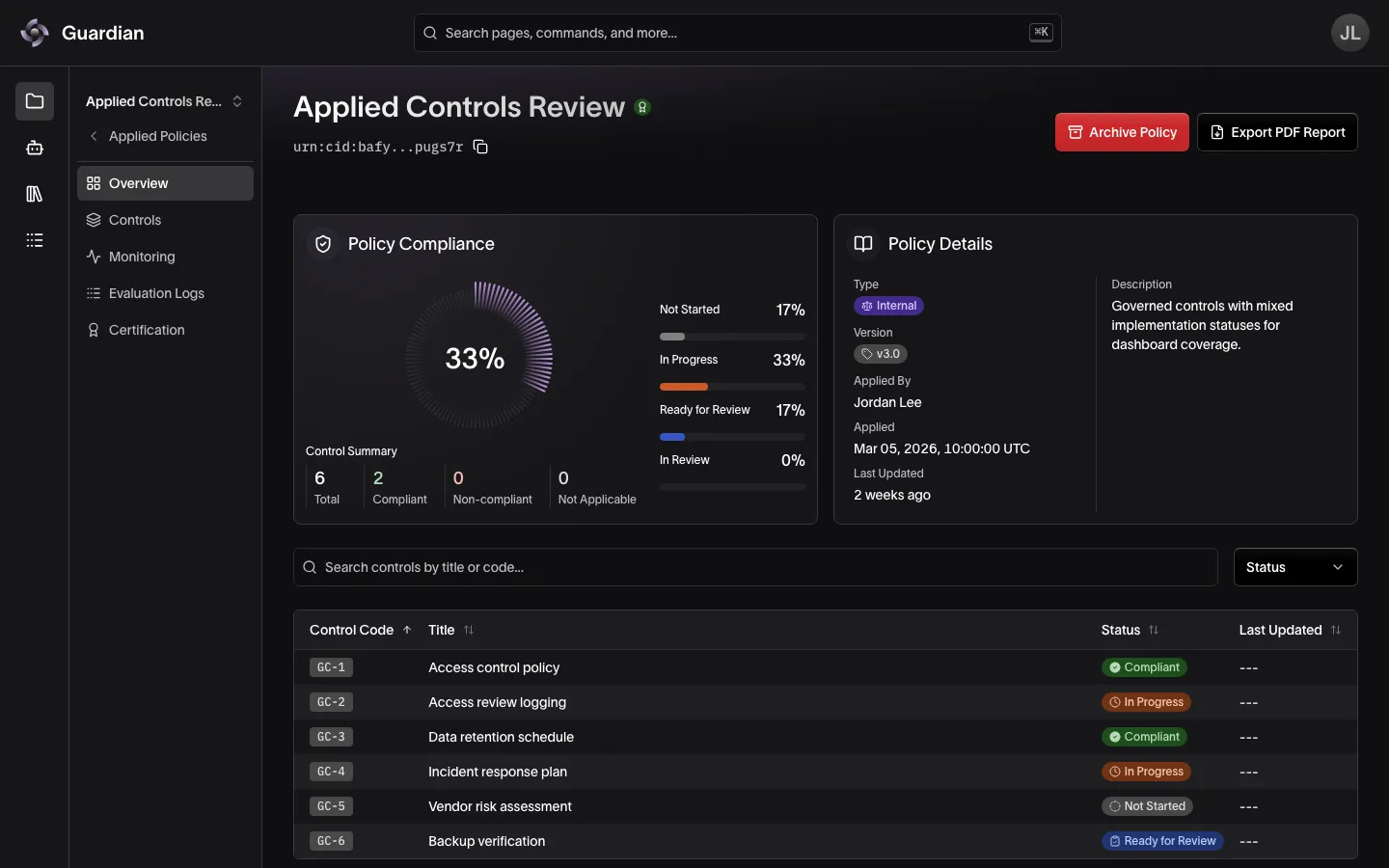
There are seven control statuses:
- Not Started: no declaration or review has been made against the control.
- In Progress: a declaration marked the control In Progress.
- Ready for Review: a declaration marked the control Ready for Review.
- In Review: a review commented General, Accepted, or Questioned.
- Compliant: a review marked the control Compliant.
- Non-compliant: a review marked the control Non-compliant.
- Not Applicable: a review marked the control Not Applicable.
Importantly, a control’s status is always informed by the latest declaration or review made against it.
Understanding control progression
A control’s status can update to any status at any time while the policy is active, with one exception:
- Reviews cannot be made while a control is Not Started or In Progress. This ensures the implementation team has the opportunity to contribute to a control before the audit team begins their review. Reviews can be made against any other status, including Compliant, Non-compliant, and Not Applicable.
Additionally, below are other clarifying points regarding control statuses and progression:
- Controls cannot return to Not Started. Once any declaration has been made against a control, it cannot revert to Not Started.
- Repeating the current status does not change it. If a declaration or review results in the same status the control already holds, the status stays the same. For example, if one reviewer submits a General comment and another submits an Accepted comment, the status remains In Review as both result in the same status.
- Controls marked Not Applicable are removed from a policy’s compliance equation. For example, if a policy has 100 total controls and 5 are marked Not Applicable, only the 95 remaining controls will be considered when calculating that policy’s compliance percentage across Guardian dashboards.
Understanding control components
- Title: A short, descriptive name for the control.
- Control Code: A unique identifier for the control within its policy.
- Description: An explanation of what the control requires.
- Citations: Reference sources that support or define the control. A control can have none. On a control’s page, select View Sources to open them.
For the rules each component follows, see Controls in Policies.
Filtering controls by status
To filter controls by status:
- In the project sidebar, select the applied policy under Applied Policies
- On the applied policy’s Overview, select the Status filter
- Select the control status/es you wish to filter by
Select a control in the table to open it, or select Controls in the sidebar to open the policy’s first control. From a control’s page, use the Search controls… box beside it to jump to another control in the same policy, or, on a narrow screen, open the list from the control’s title.
Related
- Declarations and Reviews — create the statements that set a control’s status
- Atomization — write controls that each express one obligation
- Policies — define a policy’s controls and apply it to a project
- Indicators — monitor a control automatically
- Roles and Permissions — who can declare, submit for review, and determine outcomes