
Credentials
Issue, download, and revoke credentials that attest a project has met a policy.
About credentials
A credential is an attestation that a project has met a specific policy. To certify an individual agent instead, see Agent Certifications.
Credentials are typically issued once an auditing team deems the policy’s requirements have been implemented to a satisfactory degree. When issuing a credential, the issuer must always specify an expiration date. An active credential can also be revoked at any time.
Key concepts and actions associated with credentials include:
- What a credential contains
- Issuing a credential
- Downloading a credential
- Verifying a credential
- Revoking a credential
What a credential contains
Credentials are machine-readable JSON files which follow the W3C Verifiable Credential format.
Each credential includes:
- The project and policy it attests to.
- The declarations and reviews that support the attestation, referenced by their CIDs.
- The person who issued the credential.
- A validity period, defined by its issue date and expiration date.
- A revocation status, so the credential can be revoked before its expiration date if needed.
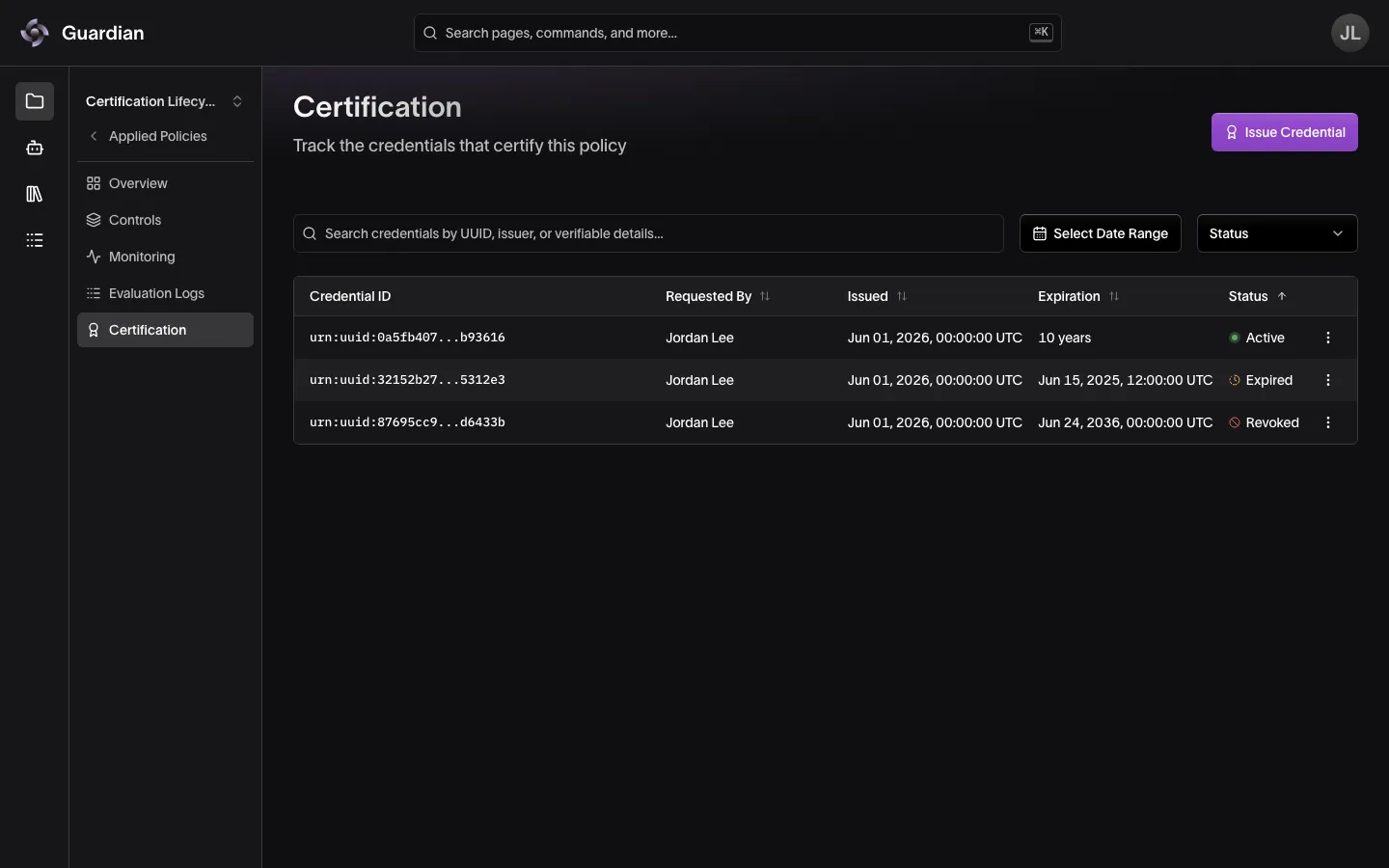
Because every credential is cryptographically-signed, anyone can verify who issued it and confirm it has not been altered since. Credentials are listed on an applied policy’s Certification page. Once an applied policy has an active credential, a Certified seal appears after its name at the top of its Overview, and a Certified badge appears beside it in the project’s list of applied policies.
The table lists each credential’s Credential ID, Requested By, Issued and Expiration dates, and Status:
- Active — within its validity period and not revoked.
- Expired — its expiration date has passed.
- Revoked — revoked before it expired.
- Invalid — not revoked or expired, but outside the validity period recorded in the credential itself.
Search the table by UUID, issuer, or credential details. The date range filter keeps credentials valid at any point in the range, and the Status filter keeps the statuses you choose.
Issuing a credential
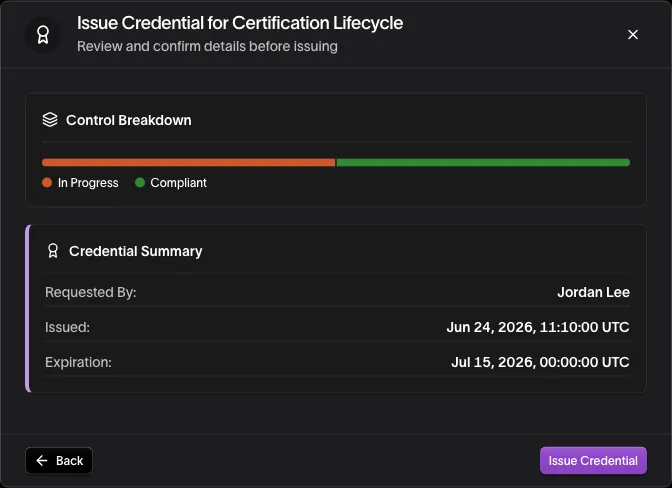
A credential can be issued at any time, regardless of how many controls in the policy have been marked Compliant.
To issue a credential:
- In the applied policy’s sidebar, select Certification
- Select Issue Credential
- Enter an Expiration Date and choose the date and time the credential will expire
- Select Review
- Review the credential summary, then select Issue Credential
Downloading a credential
A credential can be downloaded as a JSON file for independent verification.
To download a credential:
- In the applied policy’s sidebar, select Certification
- Select the actions menu (⋮) on the credential’s row
- Select Download Credential
Verifying a credential
A downloaded credential can be verified offline with the Python SDK, without access to the Guardian Platform.
-
Install the SDK.
bashpython -m pip install eqty_sdk -
Verify the file.
verify_credential.pychecks the credential’s signature. Guardian Platform credentials use a published JSON-LD context that the SDK does not embed, so the script fetches it and passes it in:pythonimport json import sys from urllib.request import urlopen from eqty_sdk import verify_vc # Guardian Platform credentials use this published context, which the SDK does not embed CONTEXT = "https://ns.eqtylab.io/vc/component-attestation/v1" with open(sys.argv[1]) as file: credential = file.read() with urlopen(CONTEXT) as response: contexts = {CONTEXT: json.load(response)} print("Valid" if verify_vc(credential, contexts=contexts) else "Not valid") -
Run it on the downloaded file:
bashpython verify_credential.py credential-<uuid>.vc.json
Valid means the credential was signed by its issuer and has not been altered. The SDK checks the signature only, so compare the credential’s expiration date yourself; the Certification page shows whether it has been revoked.
Revoking a credential
Revoking a credential invalidates it before its expiration date. This can be used, for example, if a project’s compliance status changes after the credential was issued.
Revoked credentials cannot be made active again — a new credential would have to be issued.
Revoking needs the Revoke Credentials permission, and only an active or invalid credential on an applied policy that is not archived can be revoked. Archiving an applied policy revokes its credentials automatically.
To revoke a credential:
- In the applied policy’s sidebar, select Certification
- Select the actions menu (⋮) on the credential’s row
- Select Revoke Credential
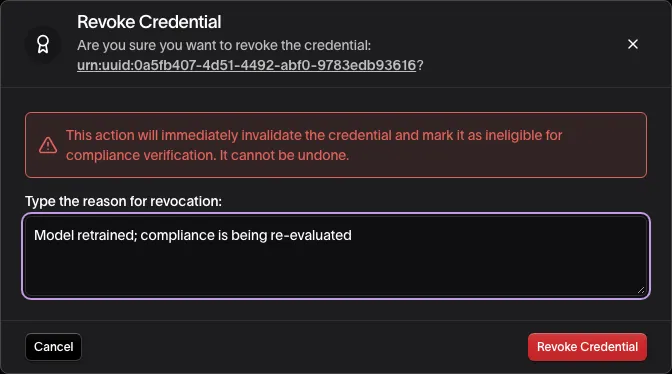
- Type the reason for revoking the credential. Revoke Credential stays disabled until you do.
- Select Revoke Credential to confirm
If the project’s agents present the credential to the Agent Gateway, the Guardian Platform also tells the gateway to stop honoring it. A warning toast appears if that update fails, since the gateway may keep honoring the credential for a few minutes.
Once revoked, the credential’s reason for revocation — along with who revoked it and when — can be viewed by selecting the credential’s row on the Certification page.
Related
- Declarations and Reviews — the statements a credential references by CID
- Integrity Actions — why an issued credential cannot be erased
- Policies — archiving an applied policy revokes its active credentials
- Roles and Permissions — who can issue and revoke credentials
- Policy Manifests and Certificates — how Integrity Service backs issuance and revocation