
Agent Configuration
See what each agent was configured with at the moment of every request, flag risky settings, and scan the files agents rely on.
Knowing which agents run in your organization is only half the picture. You also need to know how they are set up: which tools they may use, which skills they load, and whether their safety settings are on. The Agent Gateway records an agent’s configuration with every session, so you can answer those questions for any request, past or present.
What Viper captures
When Viper starts an agent session, it captures a state snapshot of the agent and attaches a reference to that snapshot to every signed request in the session. Changes made while the agent is running appear in the next session, after Viper restarts. A snapshot includes:
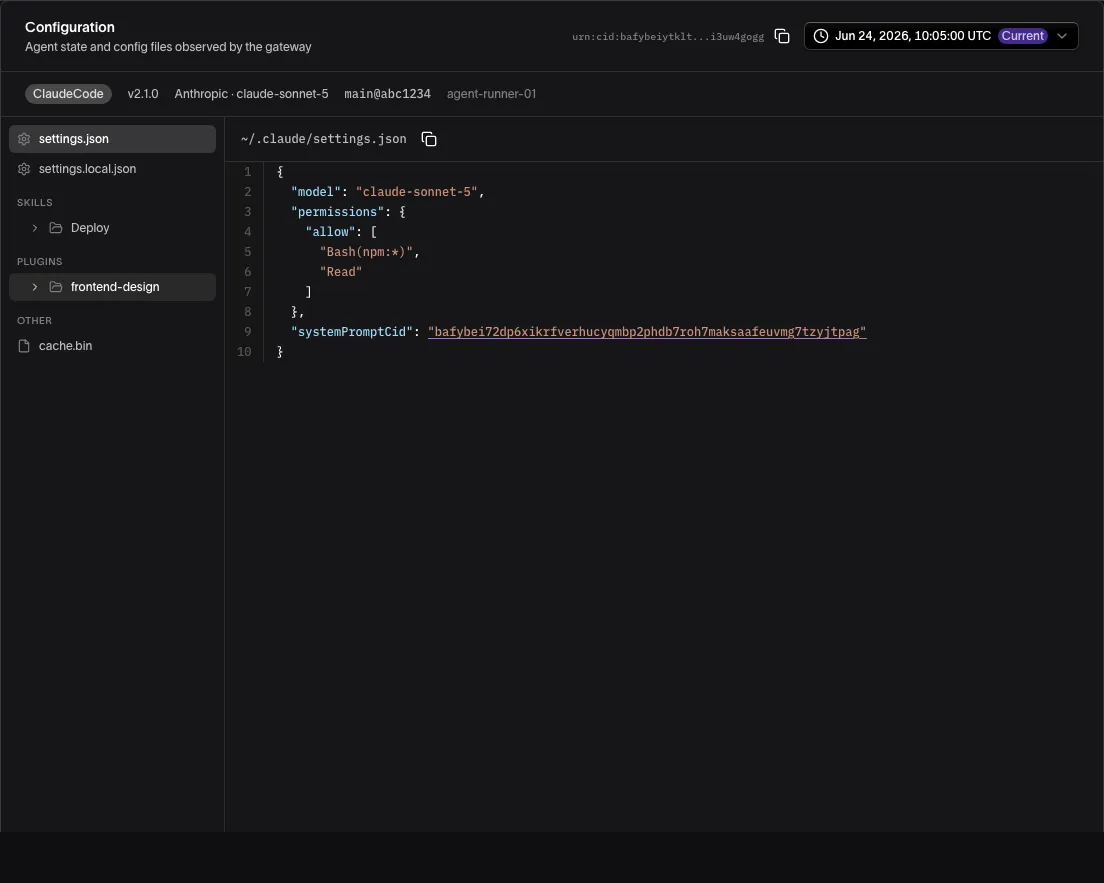
- Agent settings. The agent’s configuration files, such as Codex’s
config.tomlor OpenCode’sopencode.json. For Claude Code, Viper reads itssettings.jsonandsettings.local.jsonfiles, notCLAUDE.md. - MCP servers. For Claude Code and Codex, the MCP servers the agent is configured with, from Claude Code’s
~/.claude.json, the project’s.mcp.json, plugins and managed configuration, and Codex’sconfig.tomland plugins. Each server is recorded by its name, transport, and URL or command and arguments. Headers, environment variables and OAuth secrets are never recorded, and a URL or argument holding a credential is replaced with[redacted]. - Skills. The skills the agent has installed, plus instruction files for Codex (
AGENTS.md) and OpenClaw. - Permissions. The tool permissions the agent has been granted, where Viper can derive them (see the table below).
- Workspace and executable. The working directory’s path and git details (repository, branch, commit), plus content fingerprints of the agent program and of Viper itself, so you can tell when the tooling changes.
- Session context. The user, the git branch, the parent process, host details, and the Viper version.
- Selected environment variables. Only variables named in Viper’s configuration are read. By default these identify Daytona, E2B, and OpenShell sandboxes. See Viper Configuration.
- Request details. For Claude Code and Codex, each request’s snapshot also records that request’s provider, model, the names of the tools offered to the model, and a content fingerprint (CID) of the system prompt.
Some content is deliberately left out: symbolic links (a link to ~/.ssh would otherwise be uploaded) and folders nested more than 16 levels deep. For OpenClaw, files over 2 MiB, and anything beyond 64 MiB in total, are left out too. A snapshot is a complete record of what Viper collected, not of the whole working tree.
How much is derived per agent
For every agent, Viper attaches the raw configuration and workspace. For some agents it also reads the configuration and derives skills, permissions and MCP servers from it, and reads each request for its details.
| Agent | Configuration attached | Skills, permissions and MCP servers derived | Request details |
|---|---|---|---|
| Claude Code | Yes | Yes | Yes |
| Codex | Yes | Yes | Yes |
| OpenCode | Yes | No | No |
| OpenClaw | Yes | No | No |
For OpenCode and OpenClaw, an empty permission set means nothing was derived, not that the agent was granted nothing. The raw configuration files are still attached, so you can read them yourself.
View an agent’s configuration in Guardian
- Open Agents in the sidebar and select the agent.
- Select Configuration in the panel beside the sidebar.
- Browse the snapshot as a file tree. Select a file to see its contents.
- Use the version selector to move through the agent’s state history. Each entry shows when that configuration was observed, and the newest one is marked Current.
For Claude Code and Codex, MCP Servers in the file tree opens Configured servers: each server by name, with its transport, its URL or command, where it was configured (user, local, project, plugin or managed) and what the configuration says of it. enabled and disabled are as configured. unset is a project server nobody has approved yet; Claude Code still loads it in non-interactive runs, so it counts as configured. The files the servers came from are listed beside it, each reduced to its servers. A snapshot from a Viper version that doesn’t record MCP servers has no MCP Servers group.
When you open an agent from inside a project, the history shows only the snapshots recorded while the agent was working for that project.
A change in the history tells you when an agent’s configuration changed. To see what the agent was doing at that moment, compare the time with its exchanges in the Audit Trail.
Custom agents
An agent built with the Guardian Agent SDK, such as a LangGraph or Deep Agents agent, registers a definition of itself: its models, prompts, tools, middleware, skills, memory and sub-agents. Its Configuration panel shows that definition rather than files on a host.
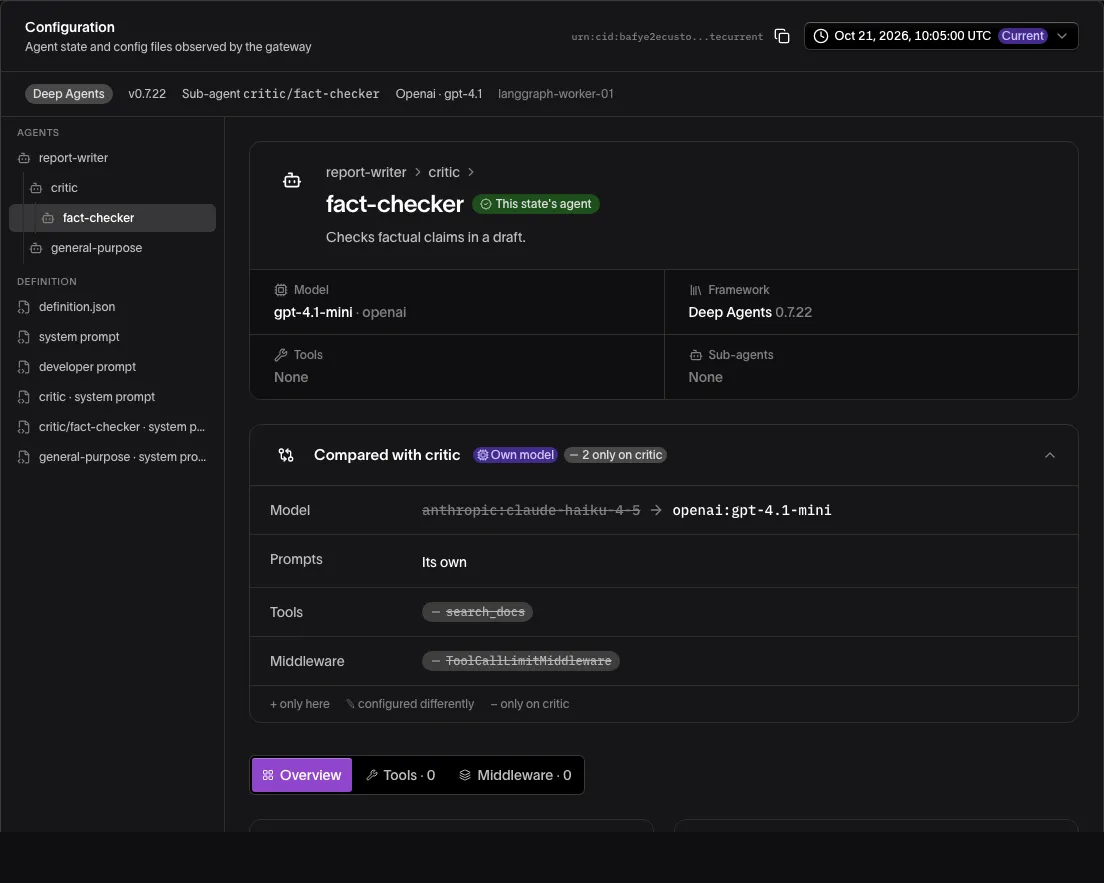
- Agents, at the top of the file tree, lists the agent and each of its sub-agents, indented under the agent above it. The panel opens on the one the snapshot shown was recorded for, marked This state’s agent. Selecting another opens its page.
- Definition holds
definition.json, the definition exactly as recorded, and each agent’s prompts. - Memory and Skills hold the files of the agent the snapshot was recorded for.
Each agent’s page has four sections:
- Overview: its models and the middleware that calls each one, its prompts, skills, memory, MCP servers (with the command each is started with, as recorded), permissions and guardrails, and source files.
- Tools, grouped by where each comes from: your own code (with a fingerprint of it), an MCP server, or not fingerprinted (the framework’s own, or tools described without their code).
- Middleware, in the order it runs, each with the settings it was built with.
- Graph, for an agent built with LangGraph: the steps it runs and the edges between them. Selecting a middleware step opens its settings.
A sub-agent’s page also has Compared with, which shows how it differs from the agent above it: its own model or prompts, and the tools, skills, memory, middleware and MCP servers it adds, configures differently or lacks.
Every request is signed as the agent itself; a request a sub-agent makes names that sub-agent, and its snapshot is recorded for it. A snapshot carries only the skill files of the agent or sub-agent it’s recorded for. To show another agent’s skills, Guardian reads them from the configuration the gateway derives from the snapshot you’re viewing, which holds every agent’s, and lists them under Skills, named for that agent. When that configuration can’t be derived, such as for a snapshot signed by a key that has since been revoked, Guardian lists them from the newest snapshot recorded for that agent among the definition’s 100 newest snapshots from the last 90 days. If there’s none, or it can’t be read, the page shows each skill’s content ID only.
A custom agent’s version selector lists its 25 newest definitions rather than each snapshot, and says when older ones aren’t listed. Viper signs a new snapshot for an unchanged definition on every restart and every few minutes, so one definition is one entry, however many snapshots named it. Each entry shows when it was last seen, who ran it (the agent, its sub-agents, or both), how many snapshots named it, and the framework and version where they changed from the entry before. Selecting it opens its newest snapshot. Show its N states lists the newest 25 snapshots of that definition from the last 90 days, each with the agent or sub-agent it was recorded for, so you can open any one of them; when more named it, the list says how many. In the agent lists, an agent built with the SDK is pictured by its framework where Guardian knows it (LangGraph, Deep Agents), and the Agent Type filter lists it under its framework.
If part of a definition doesn’t match the schema, the agent’s page says which part couldn’t be read, and definition.json still shows it as recorded.
Through the API
The version selector covers the agent’s 25 most recent observations, or for a custom agent its 25 most recent definitions in the last 90 days, plus the current one if it’s older. To go further back, or to feed snapshots into your own tools, use the Control Plane API:
| Endpoint | Returns |
|---|---|
GET /v1/agents/{agentId}/state-cids | The agent’s state history, newest first: one entry per request, with the snapshot’s CID, when it was observed, and the request’s correlation_id. Viper signs a new snapshot every few minutes and under each of the agent’s keys, so one configuration spans many CIDs. limit defaults to 100 and goes up to 1,000. |
GET /v1/agents/{agentId}/configurations | The configurations the agent’s snapshots gave in the last 30 days (days goes up to 90), newest first: one entry per configuration however many snapshots and keys gave it, with when it was first and last seen, how many requests ran it, and which keys ran it. |
GET /v1/agents/{agentId}/definitions | For a custom agent, the definitions its snapshots named in the last 30 days (days goes up to 90), newest first: one entry per definition however many snapshots, keys and sub-agents named it, with the framework and package versions it names, the sub-agents whose requests ran it, when it was first and last seen, how many snapshots named it and how many requests ran it, and which keys ran it, revoked ones included. The definition the agent runs now is always listed, marked current, even when it is older than the window. limit defaults to 20 and goes up to 100. Read a definition with the blobs/{cid} route below, through its latest_state_cid. |
GET /v1/agents/{agentId}/definitions/{definitionCid}/states | The states that named one of the agent’s definitions (a definition_cid from /definitions) in the last 30 days (days goes up to 90), newest first: one entry per state however many requests carried it, with the sub-agent it was recorded for, the keys that presented it (revoked ones included), the configurations it gave, how many requests carried it, and when it was first and last seen. Viper signs a new state for an unchanged definition on every restart and every few minutes, so these are mostly re-signings. A request whose state the gateway couldn’t read at the time is recorded with no definition, so it isn’t counted here, and the counts can be lower than state-cids shows. limit defaults to 25 and goes up to 100. |
GET /v1/agents/{agentId}/state-cids/{stateCID}/blob | The snapshot with that CID |
GET /v1/agents/{agentId}/state-cids/{stateCID}/blobs/{cid} | One file the snapshot references, such as a configuration or skill file, by its CID. Add alt=media for the file’s raw bytes instead of the JSON envelope, which refuses a file over 16 MiB with 422 referenced_blob_too_large. |
GET /v1/agents/{agentId}/state-cids/{stateCID}/findings | The validation findings from the most recent request that carried that snapshot. Add correlation_id for a specific request’s findings. |
GET /v1/agents/{agentId}/plugin-events | Results from plugins that run after the response, such as VirusTotal scans. See VirusTotal scanning. |
Organization Owners and the users bound to the agent can call these. An API key with no project binding works with full access, or with the Submit Agent Assessments scope, while its owner still holds that permission, for every request here but a state’s raw snapshot (blob), findings and plugin-events, and then reads only the agents its owner is bound to, even when the owner is an Organization Owner.
To read one project’s view, use configurations, configuration-snapshot, definitions and definitions/{definitionCid}/states under /v1/projects/{project_uuid}/agents/{agent_id}/, which require View Project Data on that project and accept an API key with that scope. They count only the requests recorded for that project: the snapshot defaults to the agent’s newest one there, a state_cid or configuration_cid must have been seen there, and current marks the definition the agent’s newest state there names. The project’s agent list and details (GET /v1/projects/{project_uuid}/agents and .../agents/{agent_id}) also give framework, like their app_type from the agent’s newest state in any project, so it can differ from the project’s own current definition.
For a custom agent, the agent list and an agent’s details (GET /v1/agents and GET /v1/agents/{agentId}) also give the framework its current definition names, with the package versions it was built with, such as {"name": "langgraph", "packages": {"langgraph": "0.6.1"}}. It is null for other agents. To list only agents built with some frameworks, repeat framework: GET /v1/agents?framework=langgraph&framework=deepagents matches the names exactly as definitions give them.
The Control Plane URL is the one Guardian is configured with for gateway features, usually on its own host and ending in /api; ask your administrator if you don’t know it. The examples read an API key from GUARDIAN_API_KEY. To list an agent’s state history:
curl "https://control-plane.example.com/api/v1/agents/urn:uuid:3f2a…/state-cids?limit=10" \
-H "Authorization: Bearer $GUARDIAN_API_KEY"{
"agent_id": "urn:uuid:3f2a…",
"current": {
"state_cid": "bafkr4i…",
"observed_at": "2026-10-15T14:02:11Z",
"observed_at_unix": 1792072931,
"correlation_id": "…"
},
"history": [
{
"state_cid": "bafkr4i…",
"observed_at": "2026-10-15T14:02:11Z",
"observed_at_unix": 1792072931,
"correlation_id": "…"
},
{
"state_cid": "bafkr4i…",
"observed_at": "2026-10-15T13:58:40Z",
"observed_at_unix": 1792072720,
"correlation_id": "…"
}
],
"correlation_id": "…"
}To fetch a snapshot, pass its state_cid:
curl "https://control-plane.example.com/api/v1/agents/urn:uuid:3f2a…/state-cids/bafkr4i…/blob" \
-H "Authorization: Bearer $GUARDIAN_API_KEY"{
"agent_id": "urn:uuid:3f2a…",
"state_cid": "bafkr4i…",
"blob": "{…}",
"encoding": "utf-8",
"size_bytes": 18342,
"correlation_id": "…"
}blob holds the snapshot as text when encoding is utf-8, or base64 when it is base64.
Configuration validation rules
Configuration validation checks each request’s snapshot against a set of rules and flags any matches. A rule’s pattern is matched line by line against the agent’s configuration files, and against the permissions Viper derived for Claude Code and Codex. Rules apply across your organization. A rule has these fields:
| Field | What it controls |
|---|---|
rule_key | The rule’s unique ID, used to change or delete it |
agent_type | Which agents the rule applies to: universal (all agents), claude (Claude Code), codex (Codex), or openclaw (OpenClaw and OpenCode) |
category | network, file-access, shell, sandbox, permissions, or skills |
label | A short name, shown with each violation |
description | A longer explanation of what the rule checks |
pattern | What to look for, as an RE2 regular expression |
flags | Any of i (ignore case), m (multi-line), and s (. matches newlines). Empty means i. |
file_scope | A file name, such as config.toml, to check only that file. Empty checks every configuration file. |
context_mode | allow-only ignores matches inside a deny block, so denying a permission is not reported. Empty reports every match. |
severity | error or warning |
message | What to report when the rule matches |
enabled | Whether the rule runs |
is_default | Set by the Guardian Platform on its built-in rules |
The Guardian Platform ships built-in rules for each of those agent types, for example:
- All agents: WebFetch permissions for blocked or dangerous domains; access to sensitive files such as SSH keys, cloud credentials, and
.envfiles; writes to system directories; unrestricted web search or browsing. - Claude Code: unrestricted shell access, dangerous shell patterns such as
rm -rfor pipingcurlto a shell, wildcard file permissions, the MCP filesystem server, the GitHub MCP server with write access, wildcard WebFetch domains, and skills loaded from remote URLs. - Codex: a disabled sandbox, approval policies that never ask, unrestricted network access, writes outside the workspace, and absolute paths in skill
extra_dirs. - OpenClaw: plugins or extensions loaded from remote URLs, plugins loaded from absolute paths, skill directories that climb out with
../, disabled safety settings, and wildcard tool permissions.
OpenCode has no rules of its own yet; it is checked with the openclaw rules plus the all-agents rules. The built-in OpenClaw rules only check openclaw.json, so they never match OpenCode’s opencode.json or opencode.jsonc. A custom openclaw rule with no file scope applies to both. Validation runs as the Configuration Validation plugin, configured like any other plugin. See Gateway Policies.
Manage rules
You add your own rules, disable or adjust built-in ones, and reset to the defaults through the Control Plane API. Any signed-in user can list rules. Creating, changing, deleting, and resetting rules needs an Organization Owner’s sign-in token, which the example below reads from GUARDIAN_CONTROL_PLANE_TOKEN. API keys are not accepted on these routes.
| Endpoint | What it does |
|---|---|
GET /v1/settings/validation-rules | Lists rules. Add ?agent_type=claude to list one agent type’s rules together with the universal ones. |
POST /v1/settings/validation-rules | Creates a rule. rule_key, agent_type, category, label, pattern, message, and severity are required. |
PATCH /v1/settings/validation-rules/{ruleKey} | Changes any field except rule_key, agent_type, and category |
DELETE /v1/settings/validation-rules/{ruleKey} | Deletes a custom rule. Built-in rules cannot be deleted; set enabled to false instead. |
POST /v1/settings/validation-rules/reset | Deletes your custom rules and re-enables every built-in rule. Send {"agent_type": "codex"} to reset one agent type, which also re-enables the universal built-ins. A reset does not undo edits to a built-in rule’s other fields. |
For example, to flag Claude Code permissions that allow a force push:
curl -X POST "https://control-plane.example.com/api/v1/settings/validation-rules" \
  -H "Authorization: Bearer $GUARDIAN_CONTROL_PLANE_TOKEN" \
  -H "Content-Type: application/json" \
  --data '{
    "rule_key": "custom-claude-force-push",
    "agent_type": "claude",
    "category": "shell",
    "label": "Bash git force push",
    "pattern": "Bash\\(git push.*(--force|-f)",
    "context_mode": "allow-only",
    "message": "Force push is allowed in Bash permissions",
    "severity": "warning"
  }'
The gateway picks up rule changes within 30 seconds.
Validation observes, it does not block
Configuration validation never blocks a request, whatever mode it runs in. It records violations and tags the exchange. In the exchange detail, the Plugin Activity section shows how many issues were found and lists each violation with its rule and severity. The findings for a snapshot are also available through the API (see Through the API).
To stop agents with a particular configuration, write a policy that reads the snapshot and denies the request. See OPA/Rego Policies. To admit only a configuration your organization reviewed, certify it and require the certification: the gateway then refuses any instance that runs another. See Agent Certifications.
VirusTotal scanning
The VirusTotal Scan plugin checks the skills that Viper derives from an agent’s configuration against VirusTotal. Because only derived skills are scanned, it covers Claude Code and Codex; nothing is scanned for OpenCode or OpenClaw (see the table above). It runs after the response has been sent, so it never slows down or blocks a request. Each unique file is scanned once and the result is reused.
| Status | Meaning |
|---|---|
pending | Submitted, waiting for a result. A failed scan stays here and is retried. |
clean | No detections |
suspicious | Low-confidence detections |
flagged | VirusTotal flagged the file |
Scanning is retrospective. Review results regularly, and revoke agents that reference flagged content. Your organization supplies its own VirusTotal API key when the plugin is configured.
Results are recorded as plugin events on the request that triggered the scan, not in the exchange’s Plugin Activity. Read them with GET /v1/agents/{agentId}/plugin-events?plugin_id=builtin.vtscan. Each item lists its events in emitted_events: a vtscan.result event carries a file’s status, and a vtscan.pending event marks a file the scanner skipped because it had reached its rate limit. Results come newest first, 50 per page by default and up to 200, with a cursor for the next page.
An adoption playbook
Most teams adopt configuration controls in stages. You do not need to do everything at once.
- Visibility. Run agents through the gateway with no enforcement. Use each agent’s Configuration page to learn what your agents are set up with.
- Baseline. Enable configuration validation with the built-in rules that match your security requirements. Review the violations to see what is normal in your organization.
- Alert on drift. Watch agents’ state history and validation results for changes, such as a new skill or a newly granted permission. Adjust rule severities so the findings you care about stand out.
- Add policy. When you are ready to block, write OPA/Rego policies for the configurations you will not accept. Start them in observe mode, then switch them to enforce mode. To admit only a configuration your organization has reviewed, certify it instead: see Agent Certifications.
- Continuous scanning. Enable VirusTotal scanning and review results for the skills and scripts your agents use.
Blocking always comes from a policy plugin. Validation rules and scans tell you what to write a policy about.
Related
- Agent Inventory — open an agent and its Configuration page
- Audit Trail — what the agent sent around the time its configuration changed
- Gateway Policies — add the Configuration Validation and VirusTotal plugins to a configuration
- OPA/Rego Policies — block a configuration that validation only flags
- Viper Configuration — choose which environment variables Viper records
- Agent Coverage — what each agent’s capture leaves out