
Plugin Configurations
Read the Gateway plugins in effect for a project, the order they run in, and their activation history.
About plugin configurations
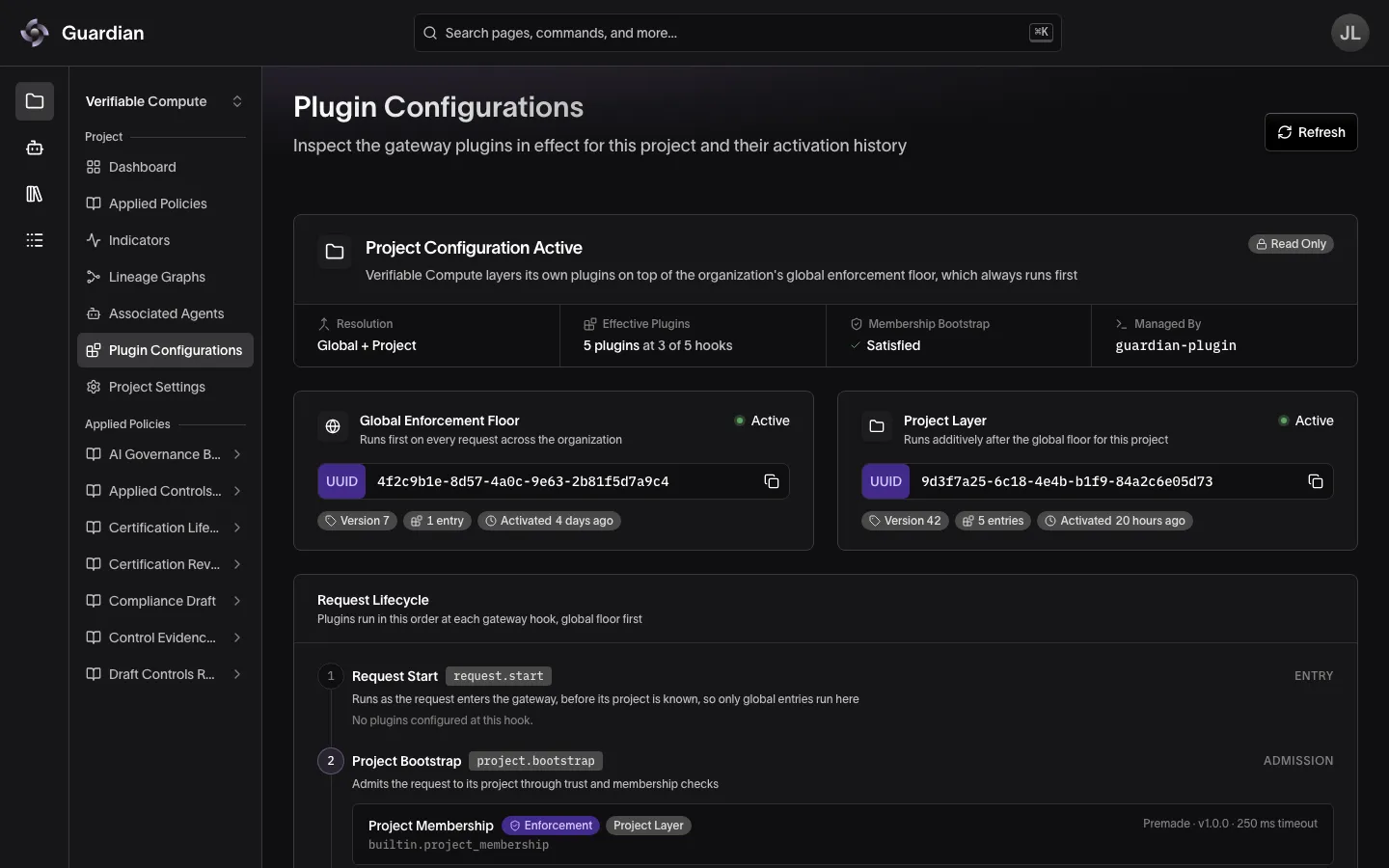
Plugin Configurations is a page in the project sidebar on deployments that run the Agent Gateway. It shows which gateway plugins are in effect for the project, the order the gateway runs them in, and the history of activations behind them.
The page is read only. Configuration is authored, published, activated, and rolled back through guardian-plugin (see Policy as Code); Guardian is a record of what the gateway resolves. Nothing on this page changes enforcement.
Refresh re-reads both the current resolution and the history.
How a configuration resolves
Two layers combine into the plugins that actually run:
- The global enforcement floor is organization-wide and always runs first.
- The project layer is this project’s own configuration and runs additively after the floor.
Either layer can be absent. The summary at the top of the page names the combination — Global + Project, Project Only, Global Only, or None — alongside:
- Effective Plugins: how many plugins run, and at how many of the gateway’s hooks
- Membership Bootstrap: whether an active layer supplies the membership check that admits project traffic
- Managed By:
guardian-plugin
If Membership Bootstrap reads Missing, the gateway is denying this project’s traffic. The layer card explains why.
For how the two layers are authored and how they combine, see Gateway Policies.
Layer cards
One card per layer records the configuration behind it: its identifier, version, entry count, and how long ago it was activated. A layer with nothing active says so instead.
When the gateway is refusing this project’s requests, the Project Layer card reads Traffic Denied. Two causes produce it: no layer is active at all, or no active layer supplies a membership check that counts. A project layer counts with any enabled membership entry; the global floor counts only with one that can deny (see Gateway Policies). If the project has no layer of its own, the card states which cause applies. Either way, the fix is to publish a configuration through guardian-plugin.
Request lifecycle
The lifecycle lists every gateway hook in execution order, whether or not a plugin sits at it:
| Step | Hook | What runs there |
|---|---|---|
| Request Start | request.start | Runs as the request enters the gateway, before its project is known |
| Project Bootstrap | project.bootstrap | Admits the request to its project through trust and membership checks |
| Before Proxy | proxy.pre | Evaluates the request before it reaches the provider |
| Provider inference | — | The gateway calls the model provider and receives its response |
| After Proxy | proxy.post | Evaluates the response and can deny it before it returns to the agent |
| Request End | request.end | Records observations after the exchange completes, without blocking it |
Within a hook, global floor entries run before project entries. Each entry shows its plugin name and ID, whether it is Enforcement (can deny) or Observability (records only), which layer it came from, and its runtime, version, and timeout. Match criteria and granted capabilities appear as badges when the entry has them; an entry with no criteria runs unconditionally.
Entries that do not run
Entries that are configured but idle are still listed at their hook, marked with why:
- Disabled: the entry is in the configuration but the gateway skips it. Re-enabling it takes a new configuration.
- Never Runs: a project entry placed at Request Start. That hook fires before the gateway knows the request’s project, so project entries there are never executed. Move the entry to the global enforcement floor or to a later hook.
Plugin details
Select any entry to open its details, covering:
- Execution: hook, match criteria, mode, layer, and timeout
- Access: granted capabilities and secret references
- Package: runtime, version, artifact SHA-256, and the configuration it belongs to
- Capability Grants and Settings: the entry’s resolved JSON
Secret references show only their source and name. The gateway never returns secret values.
The open entry is part of the page address, so you can link someone straight to a plugin, and your browser’s Back button closes the panel.
Configuration history
The history table lists the activations and drafts recorded for this project — configuration ID, version, entry count, when it was recorded, who by, and its state. Badges mark the Current configuration and any Rollback Candidate that guardian-plugin can restore.
History covers project configurations only. The global enforcement floor is organization-wide and does not appear here.
If the history fails to load, any rollback candidates the gateway reported are still listed, and the active configuration above remains accurate.
When the page has nothing to show
- Project Access Denied: you don’t have permission to view this project’s plugin configurations, so there is no Retry. See Roles and Permissions.
- Gateway Unavailable: the gateway is temporarily unreachable. Select Retry.
- Failed to Load Plugin Configurations: the gateway could not resolve this project’s configuration. Select Retry.
Related
- Gateway Policies — hook stages, modes, and how global and project configurations combine
- Policy as Code — author, apply, and roll back the configurations this page shows
- Associated Agents — link an agent so the project resolves a configuration
- Projects — the project sidebar and the pages it opens
- Audit Trail — what each plugin decided on a given request
- Agent Certifications — require certified agents in a project’s configuration