
Associated Agents
Link a registered agent to a project so project policy applies to it, and revoke or reissue its project membership.
About associated agents
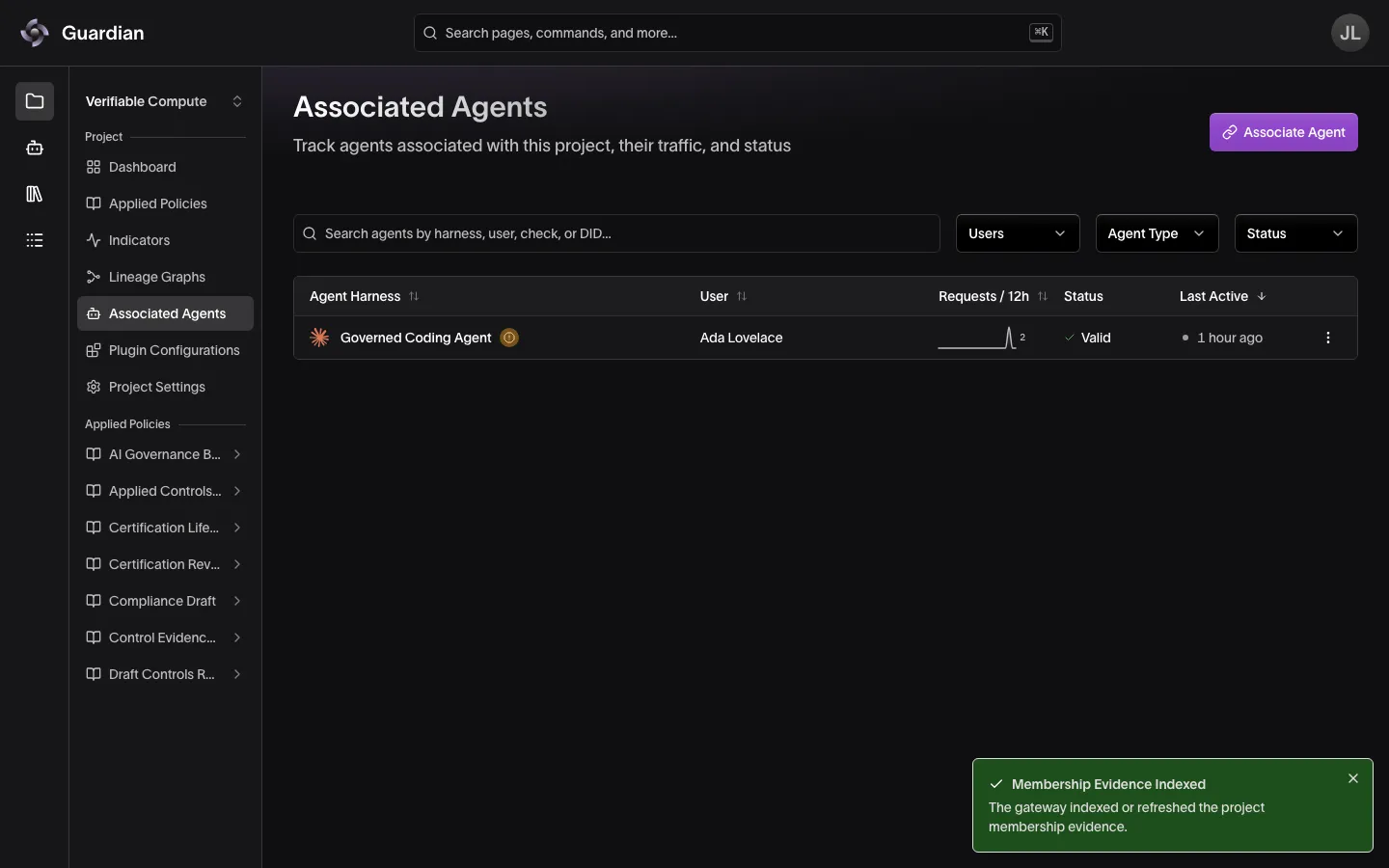
Associated Agents is a page in the project sidebar on deployments that run the Agent Gateway. It lists the agents linked to this project, their recent traffic, and the state of each agent’s project membership.
Registering an agent and associating it are two different steps. Registration enrolls the agent under your organization and mints its agent ID. Association links an already-registered agent to one project. Until you associate it, the agent can still send traffic, but this project’s views will not show it and project policy will not apply to it.
Associating an agent issues project membership evidence — a verifiable credential — through Integrity, which the gateway then indexes. You associate the agent as a whole: the credential names its agent ID, not one of its DIDs, so the membership covers every instance of the agent, whichever key it signs with. That evidence is what admits the agent’s traffic to the project, checked at the Project Bootstrap hook. How strictly it is checked is part of the project’s configuration; see Membership states and Plugin Configurations.
Associating an agent
You need the Create Agent Memberships and Edit Project Settings permissions on the project: the first issues the membership evidence and the second has the gateway index it. Project Owners and Organization Owners have both.
- In the project sidebar, select Associated Agents
- Select Associate Agent
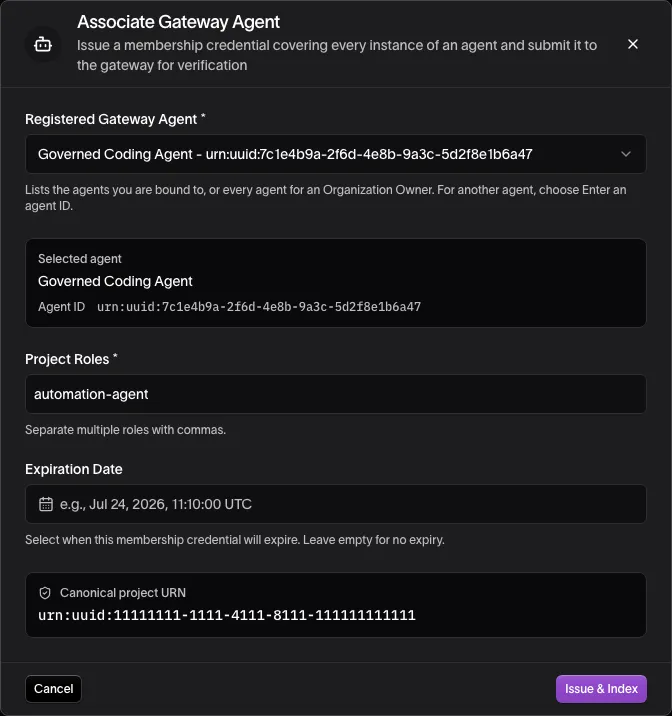
- Under Registered Gateway Agent, choose the agent. The list shows the active agents you are bound to, or every active agent if you are an Organization Owner. For an agent it doesn’t show, choose Enter an agent ID and enter the agent’s ID,
urn:uuid:and its UUID, as registration printed it and the agent’s Overview page shows it - Check Project Roles, which defaults to
automation-agent. Separate several roles with commas - Optionally, set an Expiration Date. Leave it empty for a membership that does not expire
- Select Issue & Index
When you start from an agent’s own page or its row in the Agent Catalog with Associate with Project, the agent is already chosen and the dialog asks for the Project instead.
The Guardian Platform issues the membership evidence and waits for the gateway to index it. A Membership Evidence Indexed confirmation means the agent is admitted. For an ID you entered, the confirmation warns instead when no registered agent has that ID, or when its agent is revoked or deregistered: the membership is issued, but admits nothing.
Issuance and indexing can fail independently. If Integrity cannot issue the credential, nothing is recorded and you can retry. If issuance succeeds but the gateway cannot index it, the evidence exists but the agent is not yet admitted — reassociate to have Gateway pick it up.
What the table shows
| Column | Meaning |
|---|---|
| Agent Harness | The agent’s display name, with the icon of the harness it was registered with — Claude Code, OpenCode, OpenClaw, Codex, Proxy, or Custom for a named agent. A row left by a membership issued to a DID no registered agent holds shows that DID instead |
| User | The account the agent is enrolled under |
| Requests / 12h | Requests the agent sent in the last 12 hours |
| Status | The agent’s membership state; see Membership states |
| Last Active | When the agent last sent traffic |
Search and the Users, Agent Type and Status filters narrow the list; the table collapses to cards on narrow screens.
Membership states
The state on each row is the validation status of the agent’s membership evidence:
| State | Meaning |
|---|---|
| Valid | The evidence is current and verifies |
| Not yet valid | The evidence carries a future start date |
| Expired | The evidence has passed its validity window |
| Revoked | The membership was deliberately withdrawn |
| Inactive | No usable membership evidence is on record |
Whether the gateway admits the agent’s traffic is decided by the project’s membership bootstrap entry, not by this status alone. That entry configures which statuses it accepts, whether it enforces expiration and revocation, which roles it allows, and whether it denies or merely records. The Guardian Platform’s example configurations accept Valid only, so on a default deployment any other state denies the agent’s project traffic until you reassociate — a configuration that also accepts expired evidence, or that only records, behaves differently.
To see what this project actually enforces, open Plugin Configurations and find the membership entry at Project Bootstrap. For how membership checks are configured, see Gateway Policies.
Revoking and reassociating
Row actions depend on the membership state and your permissions:
- Revoke Membership appears on a valid membership and requires the Revoke Credentials permission. It withdraws the evidence, which a project that enforces revocation treats as grounds to deny that agent’s traffic.
- Reassociate Agent appears when the membership is not valid and the agent is active, and requires the Create Agent Memberships permission. It issues replacement evidence naming the agent, even when the old membership named one of its DIDs — use it after an expiry or revocation, or when indexing failed. A row for a DID that no registered agent holds, left by a membership issued to that DID, can’t be reassociated, since a new membership names an agent.
The same menu offers View Agent, which opens the agent’s own pages, and, when agent certification is enabled, Design Profile (Edit Profile once the agent has one) and Start Assessment.
Revoking a membership is not the same as revoking the agent. Revoking the agent is an Organization Owner action that disables it everywhere, so it is on the agent’s own Overview, through View Agent; see Revoke and restore an agent.
Viewing an agent
Select a row to open the agent’s pages, listed in the sidebar under ‹ Associated Agents. The agent’s name heads the sidebar; select it to move to another agent in the project, on the same page.
- Overview: the agent’s status, project roles, membership, recent activity, keys, and its Plugin Configuration Context — which enforcement layers resolve for this project and how many plugins are in effect, with a link through to Plugin Configurations. Its Actions menu holds the row menu’s actions, Revoke Membership and Reassociate Agent among them
- Configuration: the agent’s captured configuration and state history (see Agent Configuration)
- Credentials: credentials synced from the agent
- Memberships: the project membership credentials on record, including superseded ones
- Request Logs: the agent’s exchanges for this project (see Audit Trail); an identity with no gateway record has none
Related
- Register Agents — enroll an agent before you associate it
- Plugin Configurations — the membership entry and other plugins the gateway runs for this project
- Gateway Policies — how membership checks are configured and how the layers combine
- Agent Inventory — revoke or restore the agent itself, across every project
- Roles and Permissions — who holds Create Agent Memberships and Revoke Credentials